Introduction
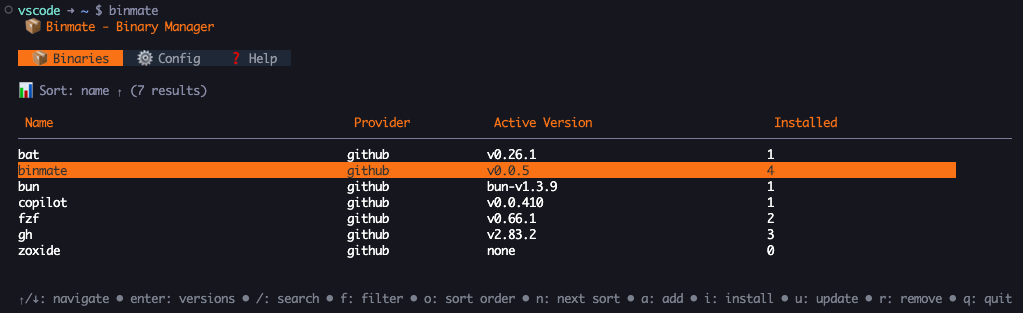
binmate is a CLI/TUI application for managing binary installations from GitHub releases. It provides an easy way to install, manage, and switch between different versions of command-line tools.
Why binmate?
Keeping command-line tools up to date - and occasionally pinning them to a specific version - usually means juggling install scripts, archives, and PATH entries by hand. binmate brings all of this together:
- Fetch releases directly from GitHub.
- Install several versions of the same tool side by side.
- Switch the active version instantly using symlinks.
- Track everything in a local database so you always know what is installed.
Key Features
- Interactive TUI - Browse and manage binaries through a Terminal User Interface.
- CLI Commands - Automate binary management with a command-line interface.
- Version Management - Install multiple versions and switch between them.
- GitHub Integration - Automatically fetch releases from GitHub repositories.
- Database Tracking - A SQLite database tracks all installations and versions.
- Checksum Verification - Ensures the integrity of downloaded binaries.
How it works
When you add a binary, binmate records the source GitHub repository and the archive format used by its releases. Installing a version downloads the matching release asset for your operating system and architecture, verifies its checksum, extracts the binary into a versioned directory, and creates a symlink for the active version.
The install path layout looks like this:
<install_path>/<name>/<version>/A symlink at <install_path>/<name> points at the currently active version, so switching versions is as simple as updating that link.
Next steps
- Install binmate on your system.
- Learn the CLI commands for day-to-day use.
- Explore the interface to see the TUI in action.
- Review the configuration options.